
Front-end
Let's Try Vibe Coding a Portfolio
I wanted my site back up fast, and I wanted an excuse to play with Claude Code more. So I gave myself a project: take a Figma design I’d been working through and turn it into a real site, with Claude Code doing the building inside VS Code.
“Vibe coding” was the joke I started with. About five days later I had 98 passing accessibility tests, four rewritten case studies, and a much clearer idea of what AI is good at and where I still have to drive.
Why rebuild at all
I’d tried Lovable before. It got something up fast, but when I checked it, it didn’t pass accessibility standards, and it felt very generic. For someone whose whole pitch is accessibility, neither of those works.
I’m also looking for my next UX leadership role, so the timing mattered.
I also wanted to treat it like a real project. Building this way has come up as more and more important this year, and custom code usually takes more time than I can put into a normal work session. A portfolio felt like the right size to try it for real.
And I wanted a blog. Mostly because so much of what’s online is people bragging, and a blog felt like a fun, human piece to put next to that. Will people find it? Will anyone read it? Who knows. But it felt like it’d be fun to do.
Ten minutes, then walk away
After a few rounds in Figma, I sent the design to Claude and asked two questions: what’s the best way to build this, and how long will it take?
The answer was Astro for real HTML pages, React only where something actually needs JavaScript (the mobile menu), MDX for case studies and posts, design tokens in one file, and accessibility tests that fail the build before anything deploys. Setup would take about an hour. The build, roughly 7 to 10 hours of Claude’s time across a few sessions.
Claude also gave me a setup guide explaining what we were doing and why. I always ask the why. I’m not going to blindly trust AI to do everything for me, especially on my own portfolio.
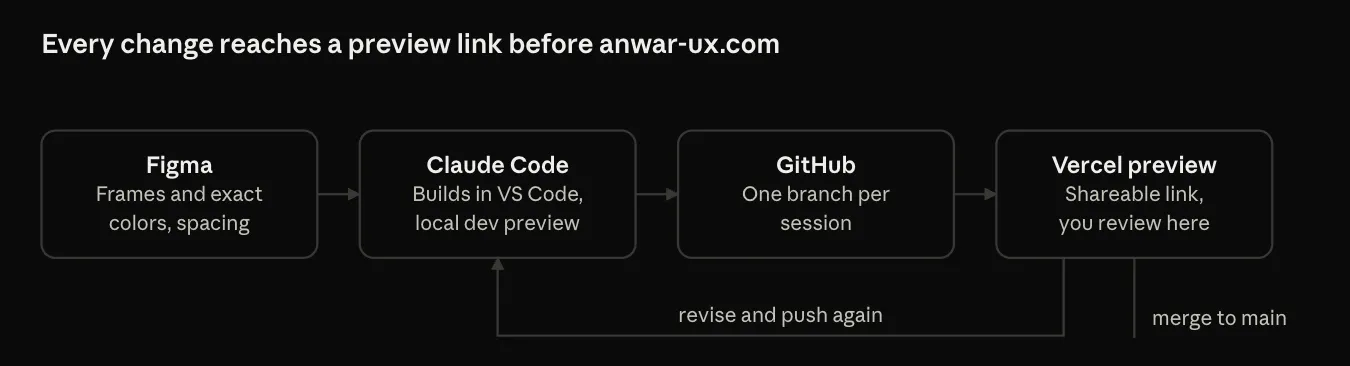
Then I jumped in: installed Node and Claude Code, and connected Figma through MCP so Claude Code could read frames, colors and spacing straight from my file.
Here’s the part I liked most. I had about 10 minutes before I needed to walk away for four hours. So I connected the repo, handed over the Figma link, and left. Claude built the foundation while I was gone: the project, the layout, the navigation, the content setup and the first 50 accessibility checks.
Worth knowing: Figma limits how many times a tool can read your file. My student team gets 200 reads a day. A View seat on another team gets 20 a month. So I locked the design down first and batched my questions by frame.
Accessibility built in, not bolted on
This is the part Lovable couldn’t give me. On this site, accessibility isn’t a review at the end. It’s in the foundation:
- One tokens file for every color, with its contrast ratio written next to it, so nobody (me included) can quietly add a color that fails.
- My bright orange is a button fill only, always with dark text on it, never used as text.
- Every page runs through axe on every build. If something fails, it doesn’t deploy.
- Tests for the things automated checks miss: the mobile menu works with a keyboard and closes with Escape, pages reflow at 320px with no sideways scrolling, and old links still redirect.
I’m a Trusted Tester, so I’ll still do a manual pass before launch. But the tests mean I’m checking the edges, not catching the basics.
What working with AI was actually like
Claude did the heavy lifting on code. What made it work was the same stuff that makes any team work: clear goals, real reviews, and saying no when something doesn’t fit.
What it did well
- It explained the why. Every plan came with reasons, and I could push on them.
- It tested everything. Every page runs through axe on every build. We’re at 98 tests now, including checks that the old links on my LinkedIn and resume still redirect.
- It handled the details. Skip links, visible focus styles, sharp responsive images and a 404 page were part of the build from the start, not a cleanup list at the end.
Where I pushed back
- I had Claude review the site as a recruiter and as a UX director. Some of it was great. Some of it, like an accessibility statement page and a contact band, felt like overkill for a portfolio, so we skipped them.
- I originally planned to hand-code four components to sharpen my front-end skills. I chose to have Claude build them while I reviewed the code, which got the site live in time for my job search. I can still take any piece back.
How I ran it
- Plan, then build. Claude Code shows me a plan before any change that touches more than one file. I approve it or redirect it before any code changes.
- One session, one branch. Each piece of work got its own branch and only merged after linting, type checks and the full accessibility suite passed.
- Rules written once. The project’s rules live in a CLAUDE.md file: accessibility requirements, design tokens, copy rules, no client names. Every session reads it first, so I never repeat myself.
- Two tools, two jobs. Claude in chat for planning, content and reviews. Claude Code in VS Code for building. Prompts moved from one to the other.
- A managed token budget. The larger model plans and a faster one builds, and I clear the context between tasks.
The design is the limit now, not the tool
This was my biggest takeaway. With Wix and Squarespace, every project turned into figuring out how to build around their boxes. The template decided what was possible, and I designed to fit it. Custom code would have fixed that, but it always took more time than I could give it.
With Claude Code, that flipped. If I could design it, we could build it. The team structure diagram on my State Government case study is a good example: I picked one of three options, asked for everything to line up, and it came back aligned to the pixel and passing accessibility tests.
So the limit isn’t the tool anymore. It’s how clear my design is, and how well I can explain what I want. Which is a very UX problem to have.
So, was it vibe coding?
Here’s where it landed:
- About five days from first question to launch
- 6 build sessions
- 98 automated accessibility tests, zero failures
- 4 case studies, rewritten for leadership roles
- 1 blog post. This one.
What I’d tell another designer trying this:
- Lock your design before you connect it. Your Figma reads are limited, and every change after that costs more.
- Ask why. If you can’t explain the stack back, you don’t own it.
- Put accessibility in code, not in your head. Tests run on every build, and they don’t get tired.
- The content is the work. AI can build the page. It can’t tell you which number is true.
So, was it vibe coding? Not really. It felt more like leading a very fast teammate: set clear goals, review the work, and say no when an idea doesn’t fit. Which, honestly, is the job I’m applying for.